
The Ultimate Guide to UX Design Process and Methodology
Read Time:6 Minute, 48 Second
Imagine scrolling through a website that’s so intuitive, it feels like it reads your mind—finding what you need in seconds, without frustration. Now picture the opposite: a clunky app that leaves you lost and irritated, prompting you to abandon it forever. That’s the power of user experience (UX) design. In a digital world where attention spans are shorter than ever, mastering the UX design process and methodology isn’t just a skill—it’s a necessity for creating products that users love and businesses thrive on. Whether you’re a budding designer, a product manager, or a business owner, understanding these fundamentals can transform how you approach digital creation. In this comprehensive guide, we’ll dive deep into the UX design process, explore key methodologies, and provide actionable insights to elevate your projects.
What is UX Design? A Quick Primer
Before we unpack the UX design process, let’s clarify what UX design truly means. User experience design focuses on crafting meaningful and relevant experiences for users interacting with a product or service. It’s not just about aesthetics; it’s about functionality, accessibility, and emotional resonance. Coined by Don Norman in the 1990s, UX encompasses everything from how a button feels when clicked to the overall journey a user takes.
Why does this matter? Poor UX can lead to high bounce rates, lost revenue, and negative reviews. According to Forrester Research, a well-designed user interface could raise your website’s conversion rate by up to 200%. By integrating user-centered design principles, you ensure your product solves real problems and delights its audience. This foundation sets the stage for the structured UX methodology we’ll explore next.
The Importance of a Structured UX Design Process
In the fast-paced realm of digital product development, winging it isn’t an option. A solid UX design process provides a roadmap, ensuring consistency, efficiency, and innovation. It minimizes risks like redesign costs and user dissatisfaction by emphasizing iterative design and continuous feedback.
Think of it as building a house: You wouldn’t start with the roof. Similarly, UX processes begin with understanding users and end with validation. This approach aligns with design thinking, a human-centered methodology that encourages empathy and experimentation. By adopting these practices, teams can foster collaboration between designers, developers, and stakeholders, leading to products that not only work but excel in user satisfaction.
Secondary benefits include better SEO through improved user engagement metrics, like longer dwell times and lower exit rates. Search engines favor sites that prioritize user needs, making UX an indirect booster for your online visibility.
Breaking Down the UX Design Process: Step-by-Step
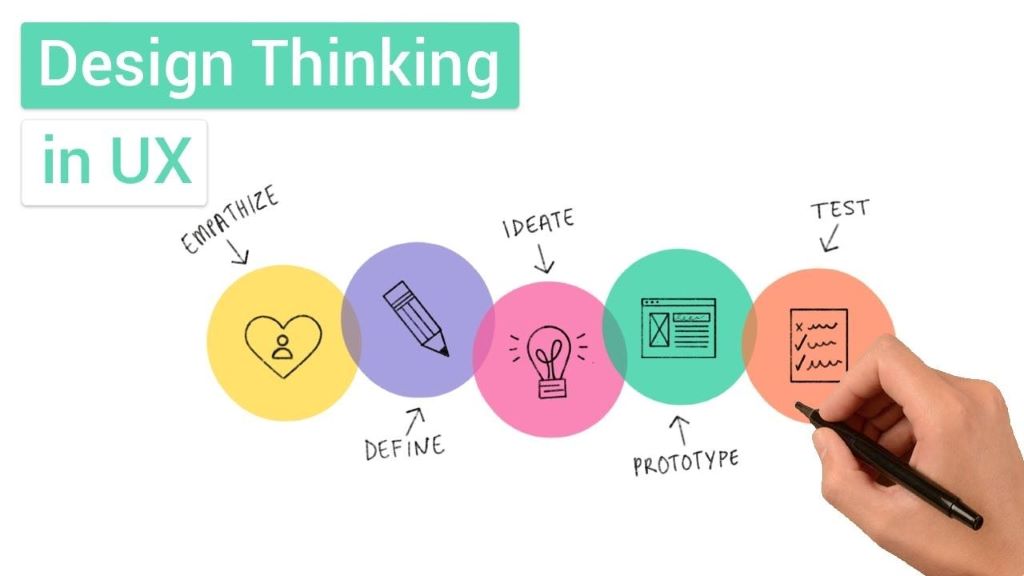
The UX design process is typically iterative and non-linear, allowing flexibility based on project needs. While variations exist, most follow a core sequence inspired by methodologies like design thinking and lean UX. Let’s break it down into key stages, complete with practical tips and examples.
-
Research: Laying the Foundation
Every successful UX journey starts with research. This phase involves gathering data to understand your users, their pain points, and the competitive landscape. User research methods include surveys, interviews, and analytics reviews.
For instance, conduct ethnographic studies to observe users in their natural environment or analyze heatmaps to see where attention lingers on a page. Competitor analysis helps identify gaps— what does your rival’s app do well, and where can you innovate?
LSI keywords like “user personas” and “empathy mapping” come into play here. Create detailed user personas: fictional characters representing your target audience, complete with demographics, goals, and frustrations. This ensures your design decisions are data-driven, not assumptive.
Tip: Tools like Google Analytics or Hotjar can provide quantitative insights, while qualitative tools like UserTesting offer real user feedback.
-
Define: Clarifying Goals and Requirements
With research in hand, define the problem and scope. This stage synthesizes data into actionable insights. Develop user stories—short descriptions of features from the user’s perspective, like “As a busy parent, I want quick recipe suggestions so I can plan meals efficiently.”
Map out user journeys to visualize the path from entry to goal achievement, highlighting potential friction points. Information architecture (IA) is crucial here, organizing content logically to enhance findability.
Incorporate accessibility considerations early, ensuring compliance with standards like WCAG for inclusive design. This not only broadens your audience but aligns with ethical UX principles.
-
Ideate: Brainstorming Creative Solutions
Ideation is where creativity shines. Encourage divergent thinking through brainstorming sessions, mind mapping, or sketching. The goal? Generate a wide range of ideas without judgment.
Techniques from design thinking, such as “How Might We” questions, reframe problems into opportunities. For example, “How might we make onboarding seamless for first-time users?”
Collaborate with cross-functional teams to avoid silos. Rapid ideation tools like Figma or Miro facilitate remote brainstorming, turning abstract concepts into tangible sketches.
Remember, quantity over quality at this stage—refinement comes later.
-
Design: From Wireframes to High-Fidelity Prototypes
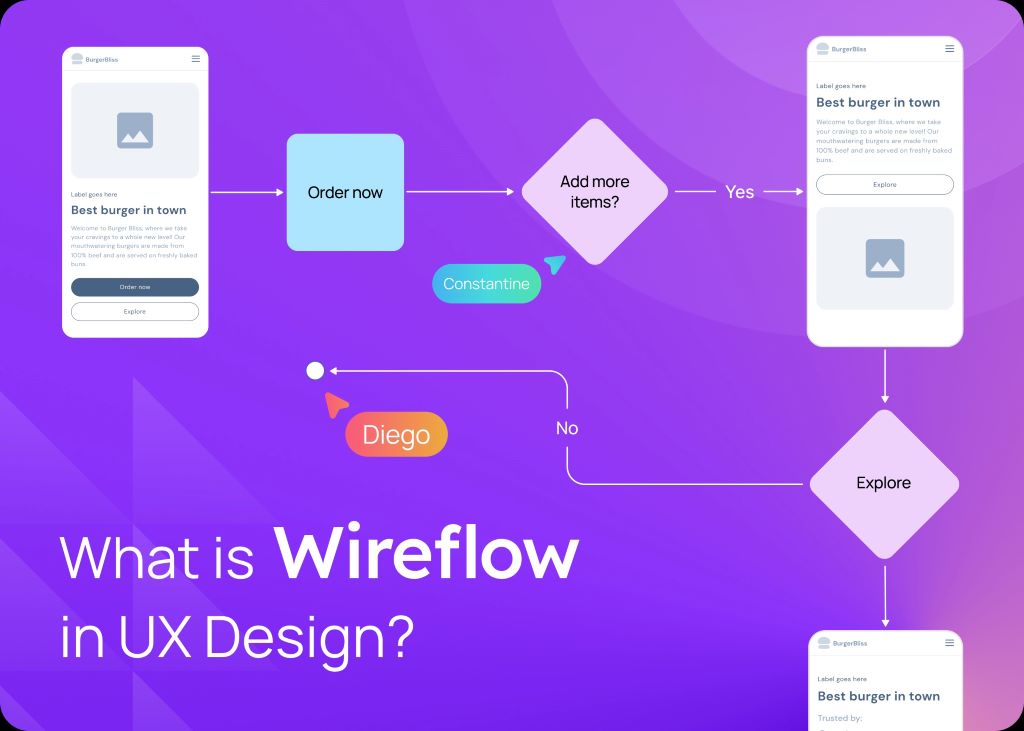
Now, translate ideas into visuals. Start with low-fidelity wireframing: simple sketches outlining layout and navigation without distracting details. This helps validate structure early.
Progress to interactive prototypes using tools like Adobe XD or Sketch. These simulate the final product, allowing stakeholders to “feel” the experience.
Incorporate visual design elements—color theory, typography, and iconography—to evoke the right emotions. Ensure responsive design for seamless experiences across devices, a key factor in modern UX methodology.
Best practice: Follow atomic design principles, building from small components (atoms) to full pages (organisms) for modular, scalable designs.
-
Test: Validating and Iterating
Testing is the heartbeat of iterative design. Conduct usability testing with real users to uncover issues. Methods include A/B testing, where variants are compared, or heuristic evaluations against established principles like Nielsen’s usability heuristics.
Gather feedback through sessions where participants complete tasks while thinking aloud. Tools like Maze or Lookback record these interactions for analysis.
Analyze results to prioritize fixes—high-impact issues first. Then, iterate: Refine designs and retest. This cycle ensures continuous improvement, embodying lean UX’s build-measure-learn loop.
In agile UX environments, integrate testing into sprints for faster feedback.
Popular UX Methodologies: Choosing the Right Approach
While the process outlines steps, methodologies provide frameworks. Here’s a comparison:
| Methodology | Key Focus | Best For | Pros | Cons |
| Design Thinking | Empathy and ideation | Innovative projects | User-centric, creative | Time-intensive |
| Lean UX | Rapid validation, minimal waste | Startups, MVPs | Fast iterations, data-driven | Less emphasis on deep research |
| Agile UX | Flexible, collaborative sprints | Software development | Adaptable to changes | Requires strong team communication |
| Double Diamond | Diverge-converge model | Complex problems | Structured exploration | Can feel rigid |
Select based on your project’s scale and team dynamics. For example, design thinking suits exploratory phases, while agile UX excels in ongoing development.
Tools and Best Practices for Effective UX Design
To streamline your workflow, leverage UX design tools:
- Prototyping: Figma, InVision Studio
- Research: SurveyMonkey, Optimal Workshop
- Collaboration: Slack, Trello
Best practices include:
- Prioritize mobile-first design for broader reach.
- Use micro-interactions (subtle animations) to enhance engagement.
- Conduct regular accessibility audits.
- Foster a culture of feedback to avoid bias.
Real-world example: Airbnb’s redesign focused on user research, leading to a 30% increase in bookings by simplifying the search process.
Challenges in UX Design and How to Overcome Them
No process is without hurdles. Common challenges include scope creep, stakeholder misalignment, or limited resources. Mitigate by setting clear objectives and using project management tools.
Another pitfall: Overlooking cultural differences in global UX. Solution? Diverse user testing panels.
By addressing these proactively, you maintain momentum and deliver superior results.
Measuring Success in UX Design
Track metrics like Net Promoter Score (NPS), task completion rates, and user satisfaction surveys. Tools like Google Analytics provide quantitative data, while qualitative insights come from user interviews.
Success isn’t static—revisit and refine as user needs evolve.
Conclusion: Elevate Your UX Game Today
Mastering the UX design process and methodology empowers you to create products that resonate deeply with users, driving loyalty and growth. From thorough research to iterative testing, each step builds toward intuitive, impactful experiences. By weaving in user-centered design, design thinking, and agile practices, you’ll not only meet but exceed expectations.
Read More:
7 Ways To Make Your Website Unique

 0
0
 0
0

Average Rating